Leonardo Cataldi's blog for Statistics' homeworks
Blog for Statistics' homework
Application 1
Click Here to download the app.
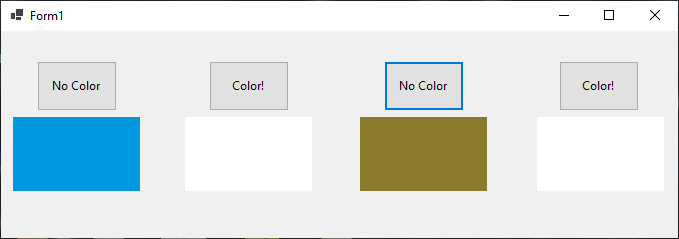
The application i created is a Windows form that contains 4 buttons and 4 picture boxes; each button reports the text “Color!”. Initially, the color of each picture box is white, but pressing one button the corresponding picture box assumes a random color. At the same time, the text on the button will change in “No Color”. Pressing another time the button will make white again the picture box, while the button will report again the text “No Color”. Pressing the buttons many times we can obtain various combinations of colours.
A screeshot from the running app is the following:
Let’s now explain how this happens, both in C# and in VB.NET. The code that follows is the C# code:
using System.Windows.Forms;

namespace App_C
{
    public partial class Form1 : Form
    {

        Random r = new Random();

        public Form1()
        {
            InitializeComponent();
            pictureBox1.BackColor = Color.White;
            pictureBox2.BackColor = Color.White;
            pictureBox3.BackColor = Color.White;
            pictureBox4.BackColor = Color.White;

        }

        private void button1_Click(object sender, EventArgs e)
        {
            pictureBox1.BackColor = Color.FromArgb(r.Next(0,256), r.Next(0, 256), r.Next(0, 256));
            button1.Text = "No Color";
            button1.Click -= button1_Click;
            button1.Click += new EventHandler(button1_secondClick);
        }
        private void button2_Click(object sender, EventArgs e)
        {
            pictureBox2.BackColor = Color.FromArgb(r.Next(0, 256), r.Next(0, 256), r.Next(0, 256));
            button2.Text = "No Color";
            button2.Click -= button2_Click;
            button2.Click += new EventHandler(button2_secondClick);
        }
        private void button3_Click(object sender, EventArgs e)
        {
            pictureBox3.BackColor = Color.FromArgb(r.Next(0, 256), r.Next(0, 256), r.Next(0, 256));
            button3.Text = "No Color";
            button3.Click -= button3_Click;
            button3.Click += new EventHandler(button3_secondClick);
        }
        private void button4_Click(object sender, EventArgs e)
        {
            pictureBox4.BackColor = Color.FromArgb(r.Next(0, 256), r.Next(0, 256), r.Next(0, 256));
            button4.Text = "No Color";
            button4.Click -= button4_Click;
            button4.Click += new EventHandler(button4_secondClick);
        }

        private void button1_secondClick(object sender, EventArgs e)
        {
            pictureBox1.BackColor = Color.White;
            button1.Text = "Color!";
            button1.Click -= button1_secondClick;
            button1.Click += new EventHandler(button1_Click);
        }

        private void button2_secondClick(object sender, EventArgs e)
        {
            pictureBox2.BackColor = Color.White;
            button2.Text = "Color!";
            button2.Click -= button2_secondClick;
            button2.Click += new EventHandler(button2_Click);
        }

        private void button3_secondClick(object sender, EventArgs e)
        {
            pictureBox3.BackColor = Color.White;
            button3.Text = "Color!";
            button3.Click -= button3_secondClick;
            button3.Click += new EventHandler(button3_Click);
        }

        private void button4_secondClick(object sender, EventArgs e)
        {
            pictureBox4.BackColor = Color.White;
            button4.Text = "Color!";
            button4.Click -= button4_secondClick;
            button4.Click += new EventHandler(button4_Click);
        }
    }
}
We can notice how, in the “Form1()” constructor, the color of the picture boxes is setted to White. Then, with the Designer tool, the event handler of the button I is set to “buttonI_Click”. When the button is clicked the handler executes: it changes the text of the button and the color of the picture box, then removes itself as an handler for the event ButtonI.Click and adds another handler that is “buttonI_secondClick”. So, when the same button is clicked, this second handler executes setting again the picture box’s color to white and the button’s text to “Color!”; after that, he removes himself as a handler and puts again “ButtonI_Click” as the handler.
Notice how, to generate a random colour, we use a Random object to generate random numbers between 0 and 256. Notice also that if we don’t remove the previous handler before adding the new one the code works, but the app will block after a few clicks due to the multiplicity of handlers that are created.
The code to do the same in VB.NET is the following:
Public Class Form1

    Dim r As New Random
    Public Sub New()
        InitializeComponent()
        PictureBox1.BackColor = Color.White
        PictureBox2.BackColor = Color.White
        PictureBox3.BackColor = Color.White
        PictureBox4.BackColor = Color.White
    End Sub

    Private Sub Button1_Click(sender As Object, e As EventArgs) Handles Button1.Click
        PictureBox1.BackColor = Color.FromArgb(r.Next(0, 256), r.Next(0, 256), r.Next(0, 256))
        Button1.Text = "No Color"
        RemoveHandler Button1.Click, AddressOf Button1_Click
        AddHandler Button1.Click, AddressOf button1_secondClick
    End Sub

    Private Sub Button2_Click(sender As Object, e As EventArgs) Handles Button2.Click
        PictureBox2.BackColor = Color.FromArgb(r.Next(0, 256), r.Next(0, 256), r.Next(0, 256))
        Button2.Text = "No Color"
        RemoveHandler Button2.Click, AddressOf Button2_Click
        AddHandler Button2.Click, AddressOf button2_secondClick
    End Sub

    Private Sub Button3_Click(sender As Object, e As EventArgs) Handles Button3.Click
        PictureBox3.BackColor = Color.FromArgb(r.Next(0, 256), r.Next(0, 256), r.Next(0, 256))
        Button3.Text = "No Color"
        RemoveHandler Button3.Click, AddressOf Button3_Click
        AddHandler Button3.Click, AddressOf button3_secondClick
    End Sub

    Private Sub Button4_Click(sender As Object, e As EventArgs) Handles Button4.Click
        PictureBox4.BackColor = Color.FromArgb(r.Next(0, 256), r.Next(0, 256), r.Next(0, 256))
        Button4.Text = "No Color"
        RemoveHandler Button4.Click, AddressOf Button4_Click
        AddHandler Button4.Click, AddressOf button4_secondClick
    End Sub

    Private Sub button1_secondClick(sender As Object, e As EventArgs)
        PictureBox1.BackColor = Color.White
        Button1.Text = "Color!"
        RemoveHandler Button1.Click, AddressOf button1_secondClick
        AddHandler Button1.Click, AddressOf Button1_Click
    End Sub

    Private Sub button2_secondClick(sender As Object, e As EventArgs)
        PictureBox2.BackColor = Color.White
        Button2.Text = "Color!"
        RemoveHandler Button2.Click, AddressOf button2_secondClick
        AddHandler Button2.Click, AddressOf Button2_Click
    End Sub

    Private Sub button3_secondClick(sender As Object, e As EventArgs)
        PictureBox3.BackColor = Color.White
        Button3.Text = "Color!"
        RemoveHandler Button3.Click, AddressOf button3_secondClick
        AddHandler Button3.Click, AddressOf Button3_Click
    End Sub

    Private Sub button4_secondClick(sender As Object, e As EventArgs)
        PictureBox4.BackColor = Color.White
        Button4.Text = "Color!"
        RemoveHandler Button4.Click, AddressOf button4_secondClick
        AddHandler Button4.Click, AddressOf Button4_Click
    End Sub
End Class
We can notice how the structure of the code is basically identical and the differences are in the syntax: in particular the way to declare variables, the way to add and remove event handlers, and the name of void functions.